
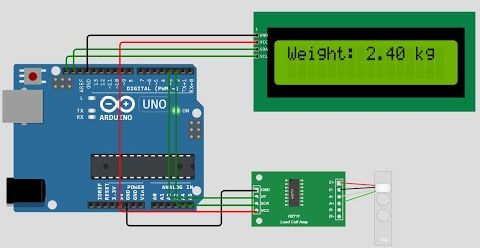
Arduino CHX711 Load Cell with LCD Display

Introduction
Creating a digital weighing scale at home is easier than ever with the CHX711 load cell amplifier, an Arduino, and a simple 16x2 LCD display. This combination allows you to accurately measure weight and display it in real-time, making it perfect for DIY kitchen scales, small robotics applications, or hobbyist electronics projects.
The CHX711 is a high-resolution 24-bit ADC (Analog-to-Digital Converter) specifically designed for load cells. It converts the tiny voltage changes from a load cell into digital values that the Arduino can process. When paired with an LCD, you can have a complete, functional digital scale with instant visual feedback.
Why CHX711?
Compared to older modules like the HX711, the CHX711 offers:
- Faster readings and improved stability
- Higher accuracy thanks to a 24-bit ADC
- Support for multiple gain channels for different load cell sensitivities
- Simple two-wire interface (DATA and CLOCK) to Arduino
These features make it ideal for projects that require precise weight measurements without relying on expensive commercial scales.
Hardware Required
- Arduino Uno, Nano, or Mega
- CHX711 Load Cell Amplifier
- Load Cell (e.g., 5kg, 10kg, or 50kg depending on your application)
- 16x2 LCD Display with I2C
- Jumper wires and breadboard
Wiring
CHX711 to Arduino
| CHX711 Pin | Arduino Pin | Notes |
|---|---|---|
| VCC | 5V | Power supply |
| GND | GND | Ground |
| DAT | D2 | Data pin to read ADC values |
| SCK | D3 | Clock pin for timing |
LCD (I2C) to Arduino
| LCD Pin | Arduino Pin | Notes |
|---|---|---|
| VCC | 5V | Power |
| GND | GND | Ground |
| SDA | A4 | I2C Data |
| SCL | A5 | I2C Clock |
Note: On different Arduino boards (Mega, Nano, etc.) SDA/SCL pins may vary. Check your board’s pinout.
Arduino Code Example
#include <CHX711.h>
#include <Wire.h>
#include <LiquidCrystal_I2C.h>

#define LOADCELL_DOUT_PIN 2
#define LOADCELL_SCK_PIN 3

CHX711 scale(LOADCELL_DOUT_PIN, LOADCELL_SCK_PIN);
LiquidCrystal_I2C lcd(0x27, 16, 2); // I2C address might differ

void setup() {
  Serial.begin(9600);
  lcd.init();
  lcd.backlight();

  scale.begin();
  scale.set_scale(2280.0); // Adjust this value to calibrate your load cell
  scale.tare();             // Reset the scale to zero
}

void loop() {
  long weight = scale.get_units(10); // Average 10 readings for stability
  lcd.setCursor(0, 0);
  lcd.print("Weight: ");
  lcd.print(weight);
  lcd.print(" g");

  Serial.print("Weight: ");
  Serial.println(weight);

  delay(500);
}
How the Code Works
- Initialization – The LCD is initialized and the backlight is turned on. The CHX711 is started, and the scale is tared (zeroed).
- Reading Weight – The
get_units()function reads the load cell multiple times and averages the value to reduce noise. - Displaying – The weight is printed both on the LCD and the Serial Monitor.
- Calibration – Adjust
set_scale()using a known weight for accurate readings.
Practical Tips
- Calibrate Properly – Always use a known weight to set the correct scale factor.
- Stable Power – Avoid using USB power alone if the load cell is heavy; fluctuations can affect readings.
- Mechanical Mounting – The load cell must be flat and firmly mounted; uneven pressure can skew results.
- Noise Reduction – Averaging multiple readings smooths out small fluctuations.
- Expandability – You can add a tare button, Bluetooth/Wi-Fi logging, or even store measurements to an SD card.
Applications
- DIY kitchen or postal scales
- Robotics for measuring payload
- Science experiments needing weight measurement
- Educational projects to learn about sensors, ADCs, and I2C communication