
Running grblHAL + CNCjs on UDOO Neo (i.MX 6SoloX) via Shared-Memory IPC

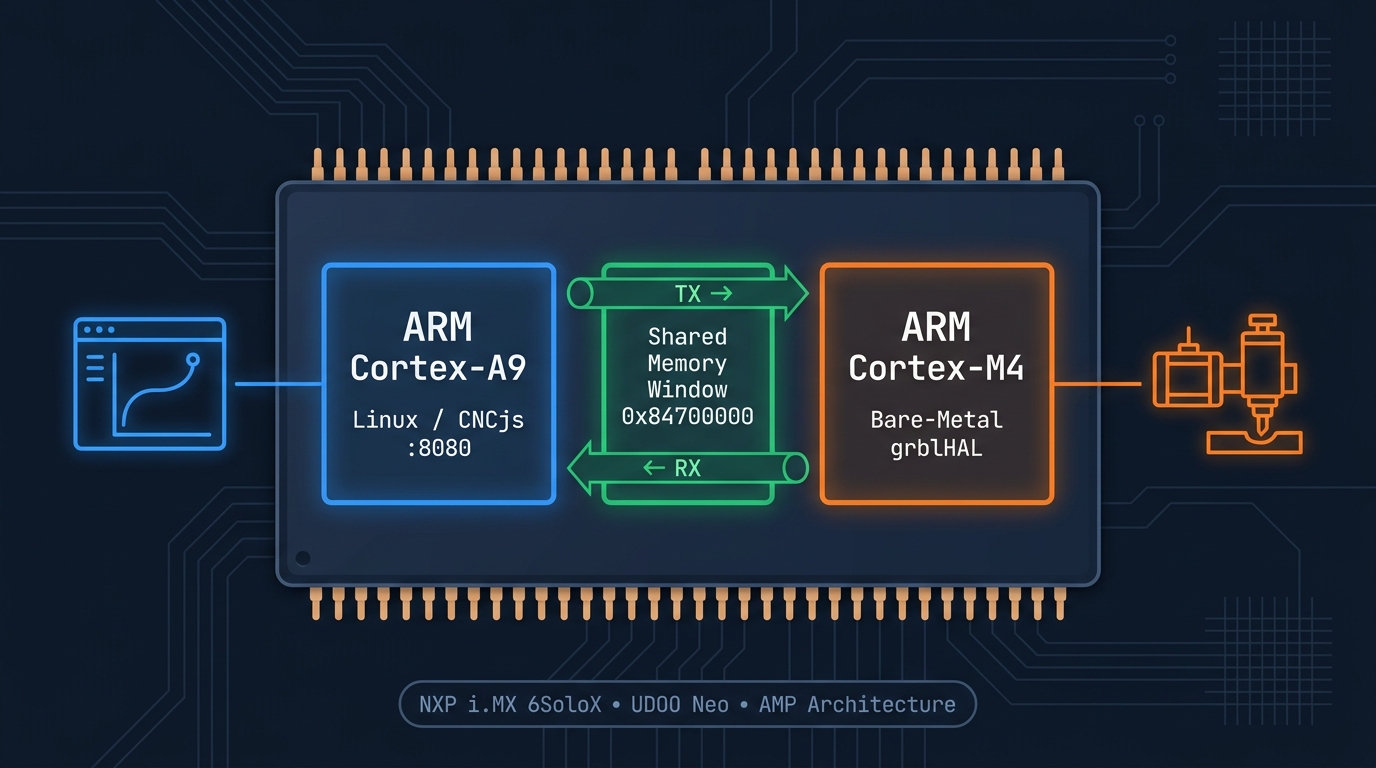
The UDOO Neo is built around an unusual SoC: the NXP i.MX 6SoloX (MCIMX6X), which pairs an ARM Cortex-A9 application processor (running Ubuntu Linux) with an ARM Cortex-M4 microcontroller core on the exact same silicon die.
In a typical DIY CNC setup, you need two separate boards—a Raspberry Pi running CNCjs and an Arduino/STM32 running Grbl connected over USB-Serial. On the UDOO Neo, both halves live inside one chip and can talk directly through a shared physical DDR memory window—no USB-UART cable, no baud-rate bottleneck, and hard real-time step pulses isolated on the Cortex-M4.
This tutorial documents the exact software versions, installs, pitfalls, and code changes made across two projects (grblHAL and cncjs) to make the whole stack boot automatically and run natively on the UDOO Neo.
1. The NXP i.MX 6SoloX & Shared-Memory Window
Unlike dual-core symmetric CPUs (where Linux schedules threads across identical cores), the i.MX 6SoloX is an Asymmetric Multiprocessing (AMP) chip:
| Core | Architecture | Role in This Project | Memory Map |
|---|---|---|---|
| Cortex-A9 | ARMv7-A | Ubuntu 18.04 Linux, Node.js, CNCjs (:8080), grbl_bridge |
Main DDR (1 GB total) |
| Cortex-M4 | ARMv7E-M (227 MHz, FPU) |
Bare-metal grblHAL 1.1f, stepper ISRs, CNC Shield GPIO | 32 KB TCML (0x1FFF8000), 32 KB TCMU (0x20000000), 7 MB DDR (0x84000000) |
| Shared Window | Uncached DDR Carveout | Lock-free A9 ↔ M4 ring buffers (rx_buf + tx_buf) |
0x84700000 (8 KB mapped) |
Memory Layout (shm_stream.h)
The Linux kernel reserves 0x84000000–0x84FFFFFF (16 MB, no-map) for the Cortex-M4. Our firmware places code/vectors in the first 7 MB (0x84000000) and reserves 0x84700000 for a shared struct (grbl_shm_t) with separate single-producer / single-consumer ring-buffer indices:
#define GRBL_SHM_PHYS_ADDR 0x84700000u
#define GRBL_SHM_MAGIC     0x4752424Cu /* "GRBL" */
#define GRBL_SHM_RX_SIZE   2048u      /* Must be power of 2 */
#define GRBL_SHM_TX_SIZE   4096u      /* Must be power of 2 */

typedef struct {
    volatile uint32_t magic;
    volatile uint32_t a9_to_m4_wr;
    volatile uint32_t a9_to_m4_rd;
    volatile uint32_t m4_to_a9_wr;
    volatile uint32_t m4_to_a9_rd;
    uint8_t rx_buf[GRBL_SHM_RX_SIZE];
    uint8_t tx_buf[GRBL_SHM_TX_SIZE];
} grbl_shm_t;- A9 → M4 (
rx_buf):grbl_bridgewrites incoming G-code and realtime bytes (?,!,~), calls__sync_synchronize(), and incrementsa9_to_m4_wr. M4 reads fromrx_buf, issues__DMB(), and incrementsa9_to_m4_rd. - M4 → A9 (
tx_buf): M4 writes<Idle|...>,ok, and[LED:ON]replies, issues__DMB(), and incrementsm4_to_a9_wr.grbl_bridgedrainstx_buftostdout.
2. Software Versions & Prerequisites
Tested directly on UDOO Neo Extended:
| Component | Verified Version | Notes |
|---|---|---|
| OS | Ubuntu 18.04.3 LTS (Bionic Beaver, armv7l) |
glibc 2.27 (ldd 2.27-3ubuntu1) |
| Kernel | 4.1.15-g23c6c7b4d23a (linux-udooneo) |
Reserves M4 DDR carveout |
| M4 Cross-Compiler | arm-none-eabi-gcc 6.3.1 20170620 (15:6.3.1+svn253039-1build1) |
Installed on-board |
| Host C Compiler | gcc 7.4.0 (Ubuntu/Linaro 7.4.0-1ubuntu1~18.04.1) |
Compiles grbl_bridge & node-gyp addons |
| M4 Uploader | udooneo-m4uploader v2.2.0 |
Loads firmware to 0x84000000 |
| Node.js / npm | v16.20.2 (linux-armv7l) / npm 8.19.4 |
Important: Node 18+ requires glibc >= 2.28 |
| grblHAL | 1.1f (branch udoo-neo-m4) |
Custom drivers/udoo_neo/ HAL driver |
| CNCjs | 1.13.0 (branch udoo-neo-m4) |
Custom UdooNeoBridge (/dev/udoo-neo-m4) |
Step 1: Install Build Tools & Node.js v16.20.2 on UDOO Neo
Apt Tip for UDOO Neo: If
apt updatefails on deadrepository-test.udoo.orgentries, move/etc/apt/sources.list.d/udoo.listaside first (sudo mkdir -p /root/apt-disabled && sudo mv /etc/apt/sources.list.d/udoo.list /root/apt-disabled/). Also holdxserver-xorg-core(sudo apt-mark hold xserver-xorg-core) before runningapt upgradeso Ubuntu does not break the Vivante Xorg ABI.
Install the C/M4 toolchain and Node.js v16.20.2 (linux-armv7l):
sudo apt update
sudo apt install -y gcc g++ make python3 git gcc-arm-none-eabi binutils-arm-none-eabi

curl -fL -o /tmp/node.tar.xz https://nodejs.org/dist/v16.20.2/node-v16.20.2-linux-armv7l.tar.xz
sudo tar -C /usr/local --strip-components=1 -xf /tmp/node.tar.xz
rm -f /tmp/node.tar.xz

node -v   # v16.20.2
npm -v    # 8.19.4
3. Part 1 — grblHAL Driver & Shared-Memory Bridge (udoo-neo-m4)
All M4 firmware and bridge code lives in projects/grblHAL/drivers/udoo_neo/ on branch udoo-neo-m4:
Key Changes Implemented
-
Linker & Startup (
linker.ld,startup.c):- Places
.vectorsand.textat0x84000000, time-critical stepper ISRs (.tcm_code) in zero-wait-state TCML (0x1FFF8000), and.data/.bssin TCMU (0x20000000). - Writes
0x000001FFto0xBFF0FFF4inReset_Handlersoudooneo-m4uploaderdetects M4 boot immediately. - Sets
SCB->VTOR = (uint32_t)vector_table;(critical: without this,SysTickjumps to0x00000000instead of0x84000000). - Enables the Cortex-M4 FPU (
SCB->CPACR |= (0xFu << 20)).
- Places
-
Hardware Driver (
driver.h,driver.c,my_machine.h):- Maps a Protoneer Arduino CNC Shield v3 directly to UDOO Neo M4
GPIO4/GPIO5pins (X/Y/Z STEP,X/Y/Z DIR,EN,X/Y/Z LIMIT,SPINDLE_EN, and Pin 13GPIO4_IO06LED). - Avoids
GPTcompletely: On i.MX 6SoloX, Linux usesGPTas its system timer during boot. TouchingGPT->CRfrom M4 hangs Linux right after the Tux splash! Instead, our driver uses:SysTick(227000cycles =1 ms) forget_elapsed_ticks(),get_micros(), andM4_STOP_FLAG(0xBFF0FFFF) soudooneo-m4uploadercan stop/reflash M4 live.EPIT1(24 MHzOSC) for step rate timing.EPIT2(EPIT2_IRQn = 57,24 MHzOSC) for step pulse off-time.
- Realtime Command Handling: Since
hal.streamis assigned directly (not viastream_connect()),driver_init()setsenqueue_realtime_command = protocol_enqueue_realtime_command;andshm_read()passes each incoming byte through it so?,!,~, and0x18work. - HAL Self-Test Capability: Sets
hal.driver_cap.step_pulse_delay = On;sogrblHALboots cleanly intoIdleinstead ofALARM:16. - Custom
$LEDCommand: Registers$LED=1|ON,$LED=0|OFF, and$LED(toggle) viasystem_register_commands()to drive the built-in orange LED (GPIO4_IO06).
- Maps a Protoneer Arduino CNC Shield v3 directly to UDOO Neo M4
-
Non-Sudo Userspace Bridge (
grbl_bridge.c):- Maps
/dev/memat0x84700000withO_RDWR | O_SYNCand bridgesstdin/stdout(or--listen <port>) to the shared ring buffers. - Installed as setuid-root (
root:dialout, mode4750) at/usr/local/bin/grbl_bridgeso userudooer(in groupdialout) can runcncjswithoutsudo.
- Maps
Build, Flash & Test M4
cd ~/projects/grblHAL/drivers/udoo_neo
make build
sudo make install-bridge   # installs /usr/local/bin/grbl_bridge (4750 root:dialout)
sudo make upload           # flashes out/grblhal.bin with 45s timeout guard
Verify M4 directly from the shell:
(printf '?'; sleep 0.3; printf '$LED=1\n'; sleep 0.3) | timeout -k 2 3 /usr/local/bin/grbl_bridgeExpected output:
Connected to grblHAL M4 shared-memory stream @ 0x84700000
<Idle|MPos:0.000,0.000,0.000|Bf:100,2047|F:0|Pn:XYZ|Ov:100,100,100|A:|Sc:>
[LED:ON]
ok
4. Part 2 — cncjs Integration (udoo-neo-m4)
On the udoo-neo-m4 branch of [email protected]:
src/server/lib/UdooNeoBridge.js: Implements aSerialPort-compatible stream wrapper (EventEmitterwithopen(),write(),close()) for virtual port/dev/udoo-neo-m4. It spawns/usr/local/bin/grbl_bridgedirectly (checkingisSetuidRoot) and also supports remote TCP testing viaUDOO_NEO_HOST.src/server/lib/SerialConnection.js: InstantiatesUdooNeoBridgewhenthis.settings.path === '/dev/udoo-neo-m4'.src/server/services/cncengine/CNCEngine.js: Prepends/dev/udoo-neo-m4to the port list returned to the UI whenevergrbl_bridgeis present.
Building & Installing on the Board
Because @serialport/[email protected]’s prebuilt armv7 binary targets GLIBC_2.28 while Ubuntu 18.04 uses GLIBC_2.27, rebuild the native addon once on the UDOO Neo:
cd ~/projects/cncjs/node_modules/@serialport/bindings-cpp
node /usr/local/lib/node_modules/npm/node_modules/node-gyp/bin/node-gyp.js rebuild
5. Auto-Start at Boot & LED Macros
- Auto-load M4 firmware on boot:
sudo cp ~/projects/grblHAL/drivers/udoo_neo/out/grblhal.bin /var/opt/m4/m4last.fw
# Ensure /boot/uEnv.txt has: m4_enabled=true- Install & enable
cncjs.serviceon port8080:
sudo cp ~/projects/grblHAL/drivers/udoo_neo/cncjs.service /etc/systemd/system/cncjs.service
sudo systemctl daemon-reload
sudo systemctl enable --now cncjs.service- Add
LED On/LED OffMacros in~/.cncrc(or via the CNCjs Macro widget):- LED On →
$LED=1 - LED Off →
$LED=0
- LED On →
Open http://<udoo-neo-ip>:8080, select Grbl and port /dev/udoo-neo-m4, and you have a self-contained single-board CNC controller running both Linux + CNCjs and real-time bare-metal grblHAL on one chip.
Comments
Join the conversation powered by GitHub Discussions.