
Design, Route & Verify PCBs with Modern Precision
A lightweight, cross-platform PCB layout CAD editor powered by SkiaSharp. Engineered with interactive vector routing, real-time Design Rule Checking (DRC), transparent JSON project files, and manufacturing-grade Gerber & GRBL export.
Engineered for Modern PCB Layout
CircuitFlow combines hardware-accelerated SkiaSharp rendering with a high-efficiency CAD design workflow.
Interactive Vector Canvas
Ultra-responsive SkiaSharp canvas with intuitive component placement, interactive trace routing, multi-item marquee selection, drag-and-drop movement, resizing, and rock-solid undo/redo (Ctrl+Z / Ctrl+Y).
Built-in Footprint Library
Comprehensive footprint catalogue ready out-of-the-box: Resistors, Capacitors, LEDs, Diodes, Pin Headers, DIP IC packages (DIP-8, DIP-14, DIP-16), Transistors (TO-92), and dev boards like Arduino Nano.
Custom Footprint Designer
Integrated Component Editor empowering engineers to craft custom SMD and through-hole footprints. Define arbitrary pin arrangements, drill sizes, silk labels, and pitch with persistent library storage.
Real-Time DRC Engine
Comprehensive Design-Rule Checking catches mistakes before ordering: component collision, uninsulated trace crossings, pin proximity thresholds, missing pin net connections, and minimum copper width violations.
Clean JSON Project Format
Transparent, version-controllable JSON file format. No proprietary black-box binaries. Version-control your PCB schematics, share templates, and customize geometries directly with scriptable ease.
Multi-Format Exports
Built-in production exporters for industry standard Gerber RS-274X, CNC isolation milling GRBL G-code, and publication-ready vector SVG artwork.
Projects Saved in Transparent JSON
CircuitFlow stores all project data — board outline, placed components, and routed copper traces — in clean, human-readable JSON format (.json). The board outline is encoded as a standard SVG path string (BoardOutlinePath), supporting arbitrary shapes including chamfers and fillets. Each component entry carries its footprint ID, position, rotation, lock state, optional junction geometry, and a display color.
Zero Vendor Lock-In
No opaque proprietary binary databases. Your designs remain fully readable, inspectable, and editable in any standard text editor.
Seamless Git Version Control
Track hardware revisions with meaningful line-by-line git diffs. Review component additions, net reassignments, and clearance changes directly in your commit history.
Scriptable & Automatable
Automate board generation, extract Bill of Materials (BOM), or run automated custom DRC validation using standard JSON tooling in Python, Node, or C#.
{
  "BoardWidth": 685.8,
  "BoardHeight": 533.4,
  "BoardOutlinePath": "M 7.62 0 L 635 0 L 660.4 25.4 L 660.4 127 L 685.8 152.4 L 685.8 495.3 L 660.4 520.7 L 660.4 525.78 A 7.62 7.62 0 0 1 652.78 533.4 L 7.62 533.4 A 7.62 7.62 0 0 1 0 525.78 L 0 7.62 A 7.62 7.62 0 0 1 7.62 0 Z",
  "Components": [
    {
      "Id": "POWER",
      "FootprintId": "header_1x8",
      "Name": "POWER",
      "Value": null,
      "X": 368.3,
      "Y": 508.0,
      "Rotation": 0,
      "Locked": true,
      "JunctionType": "Smooth",
      "Width": 188,
      "Height": 20,
      "Color": "#10B981"
    },
    {
      "Id": "DIGITAL_LOW",
      "FootprintId": "header_1x8",
      "Name": "DIGITAL_LOW",
      "Value": null,
      "X": 546.1,
      "Y": 25.4,
      "Rotation": 0,
      "Locked": true,
      "JunctionType": "Smooth",
      "Width": 188,
      "Height": 20,
      "Color": "#10B981"
    },
    {
      "Id": "H1",
      "FootprintId": "hole",
      "Name": "H1",
      "Value": null,
      "X": 139.7,
      "Y": 508.0,
      "Rotation": 0,
      "Locked": true,
      "JunctionType": null,
      "Width": 0,
      "Height": 0,
      "Color": "#10B981"
    }
  ],
  "Traces": []
}Application Screenshots
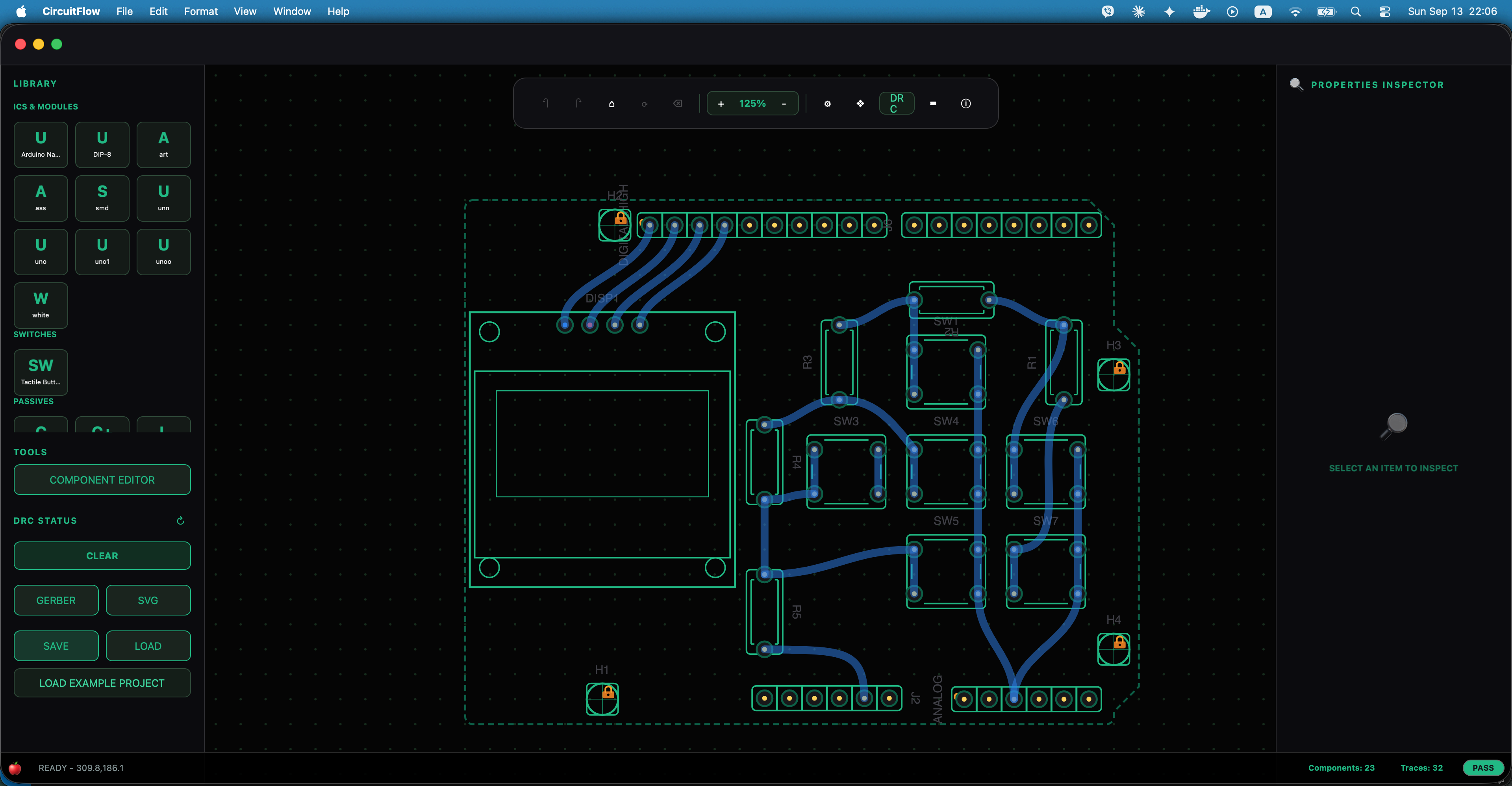
Main Canvas, Library & Inspector
Live macOS desktop execution showing the component drawer, floating SkiaSharp canvas, board boundaries, and real-time properties inspector.
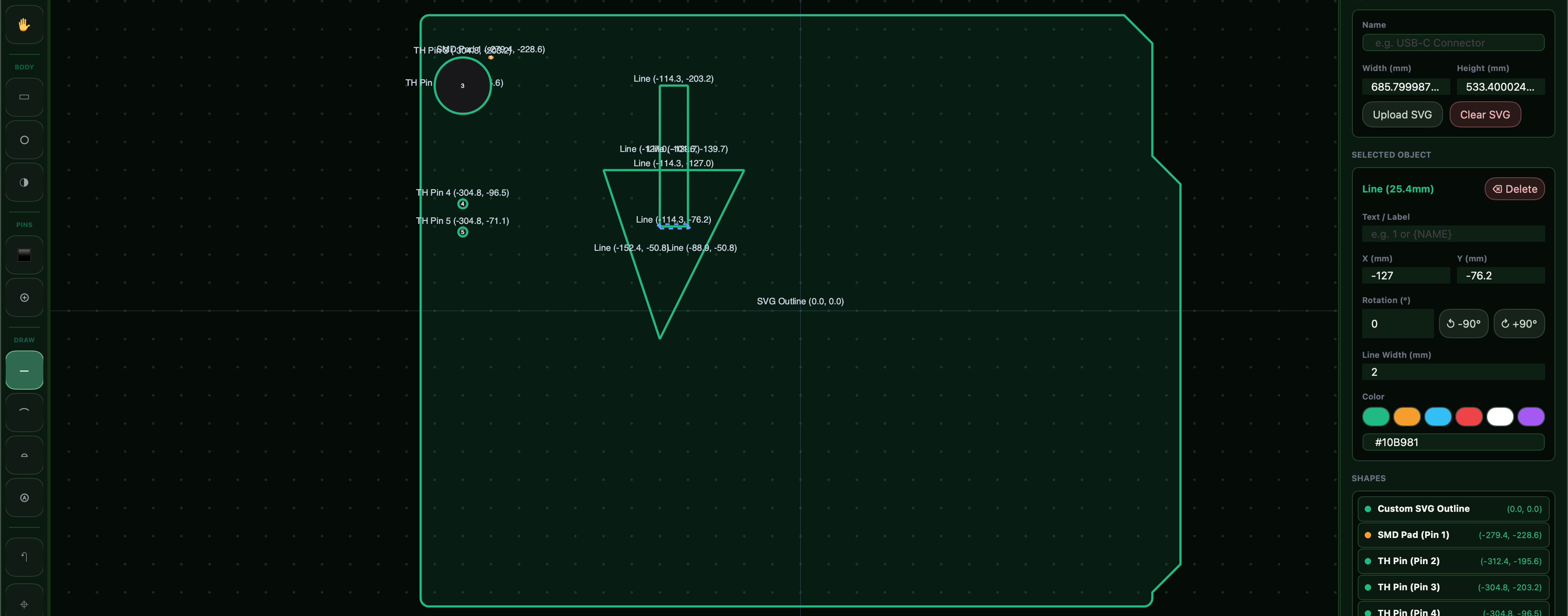
Custom Footprint & Package Editor
Visual editor for DIP, QFP, SOIC, SMD pads, custom silkscreen dimensions, and pitch calibration with persistent JSON-backed storage.
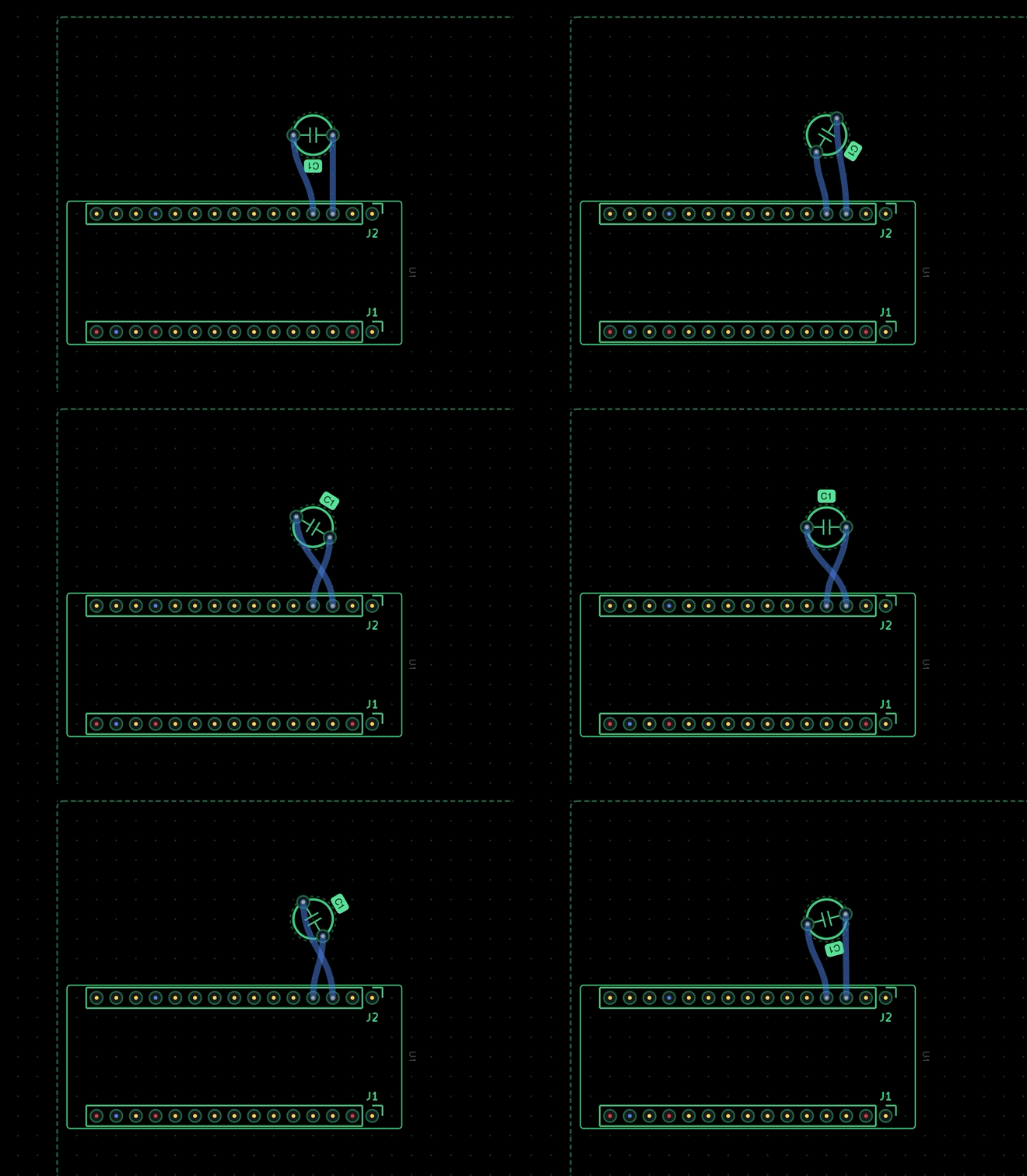
Component Placement in Action
Placing a capacitor from the built-in library directly onto the SkiaSharp canvas with snap-to-grid precision.
Live Recording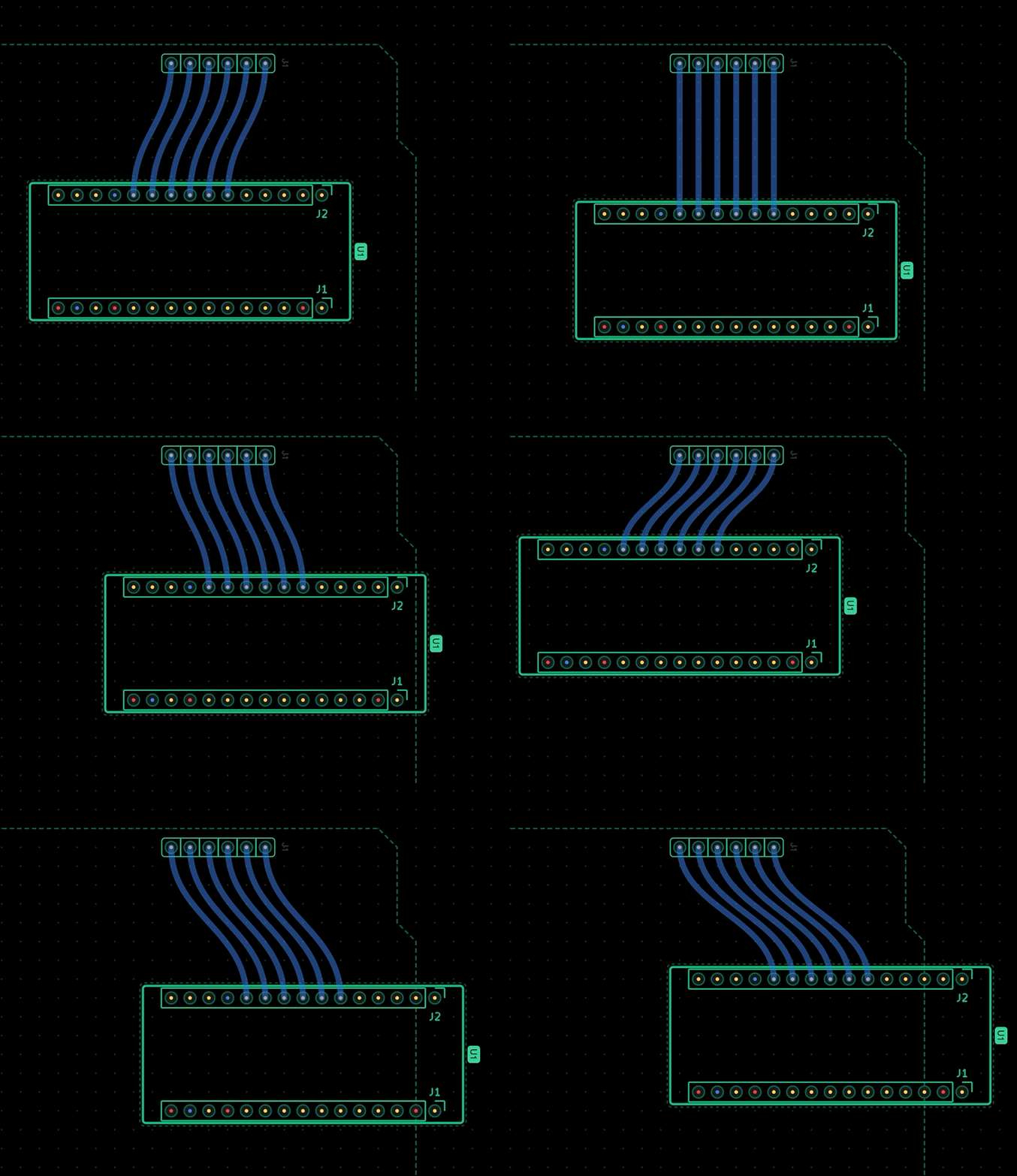
Drag-and-Drop Component Movement
Fluid drag-and-drop repositioning of placed components with live trace updates and undo/redo support.
Live RecordingSupported Operating Systems
CircuitFlow runs as a high-performance native desktop application on Windows and macOS workstations.
Platform Highlights
Keyboard & Mouse Shortcuts
| Input Gesture / Shortcut | Action | Category |
|---|---|---|
| Left-click + drag | Select, move, route traces, or marquee-select | canvas |
| Right-click + drag | Pan the canvas seamlessly | navigation |
| Scroll wheel / pinch | Zoom at the pointer location | navigation |
| Ctrl + Z | Undo last layout action | history |
| Ctrl + Y | Redo previously reverted action | history |
| Ctrl + S | Save PCB project to JSON format | project |
| Ctrl + O | Open existing JSON project | project |
| Ctrl + A | Select all components and traces | canvas |
| Ctrl + D | Duplicate selected components | canvas |
| Delete / Backspace | Delete selected items | canvas |
| R | Switch to Selection Tool | tools |
| T | Switch to Interactive Route Tool | tools |
| + / - / 0 | Zoom in / out / reset 100% view | navigation |
| Escape | Clear selection or cancel active operation | tools |
Visual Component & Footprint Editor
Need a footprint that is not in the default library? Use the built-in Component Editor to visually place pads, set drill diameters, define pin spacing, and draw silkscreen outlines.
Saved footprints are permanently preserved in your personal library and can be used immediately across any project.
Footprints are stored in clean JSON format, allowing you to easily share custom component definitions with colleagues or export them to other designs.
Releases & Downloads
Pre-compiled standalone packages and installer bundles for every supported operating system.
Windows
x64 Native • WinUI 3 DesktopStandalone portable release package for Windows 10 & 11 workstations. Extract and run directly without complex prerequisites.
macOS
Apple Silicon (arm64) • Mac CatalystNative release bundle optimized for Apple Silicon (M1/M2/M3/M4) running macOS Sonoma (14) & Sequoia (15+).
CircuitFlow.NET is a closed-source cross-platform PCB layout editor currently under active development.
All rights reserved © 2026 Robby Roboter. Contact the author for licensing and beta access inquiries.